Showing posts with label Android Apps. Show all posts

CallRecorder

This program records phone calls from the phone line on some phones. Such recording is not usually available out-of-the-box, it needs hardware support in your OS kernel and root access. If you have an HTC device, you're in clover if you've got a custom ROM. Otherwise, please visit the xda site, there're plenty. Basically any device is supported, provided that it's based on a Qualcomm chip, say, their Snapdragons, etc. If your device has no such support, the program still records phone calls, but you need to select Android API in preferences and the recording will most likely proceed from the mike, not from the line. Please feel free to make any comments or send suggestions.
For more information please read thread on xda-developers.com - http://forum.xda-developers.com/showthread.php?t=1441643 (also trial version is available)
The list of supported devices:
Requires the kernel with 2-way call recording patch and ROOT permissions:
- HTC Desire
- HTC HD2
- Google Nexus One
- HTC Desire HD
- HTC Desire Z
- HTC Desire S
- HTC Incredible S
- HTC Thunderbolt
- HTC Sensation
- HTC EVO 3D (CDMA)
- HTC Hero
- HTC Wildfire
- ZTE Blade
- Sony Ericsson XPERIA ray
- Sony Ericsson XPERIA arc
 - Samsung Galaxy S II X (SGH-T989)
- Galaxy Nexus (alsa required)
- Samsung Galaxy R (alsa & Chinese kernel required)

Use standard API for recording (may record from the mic):
- Samsung GT-I9100 Galaxy S II (Doesn't work on Android 4 ICS, Preferences: Audio source - voice uplink, and voice downlink when BT headset is connected(it will record only other side, but it's better then nothing))

Permissions:
DIRECTLY CALL PHONE NUMBERS - necessary for Call Confirm feature

Download


Smart RAM Booster Pro

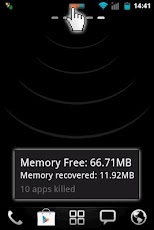
The most beautiful part of this app is a small, configurable widget that places on top of any app and one-click to RAM boost.
Recommended by AddictiveTips.

Hotest Apps by AppBrain.

Most of Android devices bundle with limited memory. Android task manager will selectively kill low priority tasks in order to reserve memory to higher priority task. That’s not always run at an appropriate time, causing low responsive apps, lagging, especially when you launch a new app after heavily browsing web pages. It causes a worse experience.


How RAM Booster works

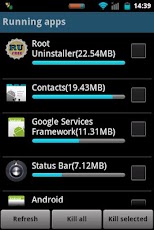
RAM Booster is designed to overcome these issues by selectively kill less important apps that are running in the background but consumes considerable device’s memory.
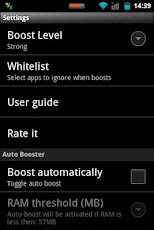
RAM Booster comes with auto-boost in 4 levels: aggressive, strong, medium, gentle.
☆ Aggressive: kill most of low priority apps

☆ Strong: Kill apps that is low priority as well as consume lightly below an “average”
☆ Medium: kill apps that consumes memory above an “average”
☆ Gentle: kill only apps that uses considerable memory

“Average” is evaluated real-time based on running apps and change over time.
How to work RAM Booster
There are 5 ways to boost

☆ Auto-boost: boost automatically under RAM available & timing conditions
☆ Overlay widget – Enable RAM Booster overlay widget (on by default), adjust widget’s position, and tap on widget to boost anytime you want
☆ Home screen widget – one tap to boost (long-press your home screen>Widget to add RAM Booster widget)
☆ Notification bar – one tap to boost (toggle notification bar visibility in app’s setting)
☆ Boost Now – tap this button from app’s main screen

Tool:

☆ 1-click cache cleaner


There are plenty options from app’s settings to twist boosting process:
☆ Boost level: select a boost level
☆ Nice themes at your choice
☆ Whitelist apps: apps will not be killed when boosting
☆ Boost automatically: auto-boost, come with minimal RAM threshold and Boost interval
☆ Report style- define how to show reports
☆ Feedback- a haptic feedback when touch on boost widget
☆ Overlay widget position/size - Change overlay widget position/size
☆ Overlay widget transparency- Change transparent/opaque level
☆ OnClick/OnLongClick options for overlay widget

Download

Epidemic Apk 1.10

6:36 PM Sunday, June 24, 2012


Download Epidemic 1.10 for android via mediafire updated
Requirements: Android version 2.2 and apk v1.10  Epidemic full
Overview: You are tasked to eliminate the human race unlock. Destroy humanity with your virus.

Epidemic Apk 1.10 for android
Epidemic is a fun and fast-paced strategy game where you are tasked to eliminate the world population with a deadly virus.

Drag the status drawer from the top to fast forward your destruction, and watch the chaos unfold from a real-time news feed.

Based on the smash-hit flash game "Pandemic", this app brings the endless fun of viral outbreaks straight to your phone.

* Read about your virus in real-time as the news ticker above documents the destruction of the human race.
* Laugh as governments panic, and begin to shut down their harbors, airports and borders.
* Destroy every hospital on the planet long before the vaccine can be finished.
* Create a zombie invasion by adding Skin Decay as well as Insanity to your victims to further the destruction of the planet.


FAST MIRROR
DOWNLOAD LINK
https://play.google.com/store/apps/details?id=com.mroberts.epidemic


Free Love Hurts Free v1.0.1 download
Requirements: Android version 1.5 or apk 1.0.1 higher update
Overview: STYLISH AND ACTION-PACKED GAME ABOUT LOVE ADVENTURES OF ROMEO!
Love Hurts Free 1.0.1 Apk

Enjoy Love Hurts with the following features:
- Great graphics.
- Addictive gameplay.
- Easy-to-operate control.
CAUTION – YOU WON’T BE ABLE TO PUT DOWN THIS STYLISH AND ACTION-PACKED GAME. Poor Romeo... for him, love does hurt! Use accelerometer and touch-screen controls to help Romeo to avoid dangers of Love and win the Girl’s heart.
Supported OS versions: 1.5, 1.6, 2.1, 2.2, 2.3
Supported screen resolutions: 320x480, 480x800, 480x854


FAST DOWNLOAD
Download Here:


Download SPB Shell 3D v1.6 full

SPB Shell 3D 1.6 android
SPB Shell 3D Apk

SPB Shell 3D: next generation user interface. Enjoy your phone!

To launch SPB Shell 3D press the Home button once installation is completed.

Features:

3D Home screen/launcher
Smart folders
3D widgets
Collection of panels and widgets

Release notes:

Tablets are not supported
Live wallpapers are not supported (for performance reasons)

HTC Thunderbolt users: there is a chance of black screen on app launch.


FAST DOWNLOAD
Download Here:


Download System Tuner Pro v2.1.4 Full
Requires Android version 1.5+ Apk 2.1.4 updated application
Overview: The most complete all-in-1 Android system unlocked tuner for your phones and tablets!

System Tuner Pro Apk 2.1.4 for android
System Tuner Pro Apk

Monitor and record your phone's logs, app/process activities, CPU, memory (RAM, internal storage, internal & external SD).
By far the lowest consumption monitoring app!

App checked with Privacy Inspector! If you don't want WIFI, BT, PHONE and GPS permissions, please check app 'Limited System Tuner Pro'.

Use logcat to debug or help debug your favorites apps :)
Use terminal emulator for direct linux commands
Highly configurable! Check web-site for app consumption!

The app can:
- Show data (cpu, memory) in the status bar
- Sort processes by cpu time, total cpu time, start time, cpu consumption, memory used or simply by name
- Filter system processes or user-defined excluded list
- Shows cpu load/frequency, memory/internal/sd usage
- Record (optionally at boot) activities in the background
- Allows analyzing previous recordings
- Display log(cat) for all/one process
- Display memory details (RAM & internal)
- Display SD details (internal & external)
- Run command using terminal emulator
- Kill non manually excluded apps automatically

The app can also do the following on rooted phones:
- Tweak SD cache size to boost performance (not all phones supported, please report)
- Tweak Android auto-kill memory settings
- Tweak CPU governor + frequencies

The widget can:
- Use different backgrounds (HTC or Google-like) half or fully transparent
- Show cpu load, free/used memory (flash/internal/sd) available, process count, using text or 2 side levels.
- Starts 2 different actions by clicking on the icon or label, including:
. Start/stop recording process activity
. Kill all non-excluded processes
. Refresh
. Start task manager
. Open analyzer
. Open settings

-== Check web-site for tests on various phones ==-
-== Does consume very little CPU/battery ==-

All system apps are excluded by default!
Kernel processes cannot be killed

What's in this version:
Apk 2.1.4:
Add sysctl support for phones without busybox
Fix boot cache cleaner
Other bug fixes
2.1:
New voltage save/load buttons
New widget option for external SD
New widget and logcat text size options
Fix voltage reset/default button on some kernels
2.0.1-1.5:
New graphic widgets (pro only)
New sysctl tweak screen
New memory consumption recording
New sharing button in backup list
New event management screen
New backup/restore of APK on non-rooted phones
New SD app management support


FAST DOWNLOAD
Download Here:


Fruit Slice apk v1.3.8 AdFree Download
Requirements: Android version v2.1+ apk 1.3.8 full
Overview: The best free fruit game comes to Android!
The BEST FRUIT juicy game on MarketPlace, and it's FREE!


Fruit Slice 1.3.8 Apk

The best free fruit game comes to Android!

The BEST FRUIT juicy game on MarketPlace, and it's FREE!
Slice fruit by your finger, and enjoy fruit juice!

Can you be Master Shifu of Fruit?

* The best performance, run well on low CPU phones.
* The smallest app size with very high game quality.
* Swipe to play game.

Recent changes:
V1.3.1
Optimized permformance for some devices, i.e. ZTE phones.
Fixed a force close bug.


FAST DOWNLOAD
Download Here:


Paper Toss v1.2.1 Ad-Free apk
Requirements: Android version 2.1+ download 1.2.1 full version
Overview: The hit game has finally arrived for Android!

Paper Toss 1.2.1 Apk

Have you ever been bored at work, crumpled up a piece of paper and counted how many times you can make it in a small trash can? Has your boss ever gone out for a quick bite while you and your co-workers see how far you can move the trash can away and still make the paper shot? Have you ever brought in electric fans to make the shot even harder? Backflip Studios is happy to announce that we have brought this amazing and hilarious experience to Android.

This game is oddly satisfying . . . much like tossing a real ball of crumpled paper into a metal trash basket. So realistic, you will think you are stuck in an office killing time.

Amaze, share and compare your scores with friends and others on the online global scoreboard.

Game includes:
-Gorgeous graphics
-6 levels of varied difficulty
-Innovative flick control
-Hi-Res graphics for newer devices
-Global online scoreboard
-Animated paper
-Real office sounds
-Varying wind speed from fan impacts paper flight
-Verbal abuse from angry co-workers

Let us know what you think.

You can follow us on Twitter at: http://twitter.com/backflipstudios

"Paper Toss" has been installed more than 35,000,000 times - give it a shot if you haven't yet. Also try "NinJump" our latest FREE game for Android.

Recent changes:
- Minor bug fixes.
Less description »

Latest version: 1.2.1 (for Android version 2.1 and higher, supports App2SD)


FAST DOWNLOAD
Download Here:


Poweramp Dark Metallic Skin v1.0.5 
Requirements: Android version 2.1+ Download apk 1.0.5 full
Overview: This is skin pack for Poweramp 2.0 full version. This is not a music player. Please install Poweramp first.
Poweramp Dark Metallic Skin 1.0.5 Apk
This new theme will make your Poweramp looks like oldschool player with metal controls.


This is skin pack for Poweramp 2.0 android. This is not a music player. Please install Poweramp first.

This new theme will make your Poweramp looks like oldschool player with metal controls.

!!!Attention!!! If you have force close when push button "Start PowerAMP/Open Theme Options", you still can apply theme in Poweramp settings manually.

After installation switch skin in Poweramp settings.
In Poweramp press menu button -> Settings -> Theme. Then choose Dark Metallic Skin.


FAST DOWNLOAD
Download Here:

Andy - Siri for Android (Full)

Andy. The answer to all your questions!
This is a full and advertising free version of Andy (Siri for Android).
This version has no daily limit on number of questions you can ask and it comes with additional functionality, such as Bluetooth (A2DP), shake recording and access to question database. All this is missing in a free version of Andy.

About Application: 
Andy is a voice controlled access to encyclopedic information on a vast array of topics. Ask anything. Andy covers culture and the arts, biographies and persons, geography and places, society and social sciences, history and events, natural and physical sciences, technology and applied science, religion and belief systems, health, mathematics and logic, philosophy and many other topics.

You can also ask about weather and time in any city, get answers to algebra questions, conversions, or simply ask any question just like you would do a search online.
To ask a question, tap the microphone button on the application home screen. Alternatively, you may give your device a little shake (this requires enabling the Shake Recording option) or simply type in your question manually to get the answer.

One of Andy's great features is its design to work with Bluetooth headsets (A2DP only, must pair with at least one device). Andy (using your Android phone or tablet) will recognize your voice and speech, search the Internet for the best answer, and read it back to you in a clear voice. The answer will also be displayed on your device screen.
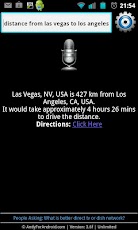
Additionally, Andy can send text messages, initiate phone calls, give you directions and do distance measurements, time range measurements and a lot more.

Download

Kids Connect the Dots v2.1.2
Requirements: Android 1.6+
Overview: Millions of children have already enjoyed the friendly themes, bright illustrations, and encouraging vocal cues of its lite version. While the free version contains 25 puzzles, this paid app features more than a 100 simple connect-the-dot puzzles and promises to keep your little one enthralled.

Kids Connect the Dots 2.1.2 APK
Kids Connect the Dots APK

Millions of kids already connect with this dot-to-dot game.
This app is now optimized for both phones and tablets.

Keep your preschoolers occupied while they gain and improve their number and letter recognition skills with Kids Connect the Dots, the acclaimed digital version of the classic game.

Millions of children have already enjoyed the friendly themes, bright illustrations, and encouraging vocal cues of its lite version. While the free version contains 25 puzzles, this paid app features more than a 100 simple connect-the-dot puzzles and promises to keep your little one enthralled.

Choosing the play button immediately begins a connect-the-dot adventure. With a preschool-friendly interface, the app is simple enough for your child to play without any help. The dots may be customized to display upper or lower case alphabet letters, and odd or even numbers. The child can connect the dots by either finger-drag drawing or single tapping from dot-to-dot. As he or she progresses, the next dot lights up. This hint command may be controlled to occur immediately or after the screen has been idle for three seconds.

When children succeed in connecting all of the dots, the outline is delightfully transformed into a colorful graphic. It might be a bird or muffin, a giraffe or a treasure chest. Preschoolers are surprised and filled with wonder to see the creatures and objects they have created "come to life".

Parents can emphasize the importance of following a sequence by activating the app's audio cues. When the audio mode is selected, a pleasing narrator guides your preschooler through the activity, naming each letter or number he touches. The narrator also gives your budding genius an upbeat affirmation before the child moves on to the next puzzle.

The images that appear when your child completes a picture are not always easy to guess. This lends an element of mystery to the activity, developing your preschooler’s imagination and love of learning.


FAST DOWNLOAD
Download Here:
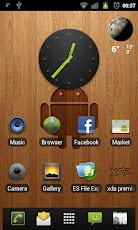

ssLauncher the Original v1.6.5
Requirements: Android 2.2+ apk 1.6.5
Overview: More freedom to your device!

ssLauncher the Original 1.6.5 Apk
ssLauncher the Original Apk

'ssLauncher the Original' is implementing all features of ssLauncher(free version). Additionally, this includes more features, some of which will be applied to the free version with approximately monthly intervals.

* Features
- all of ssLauncher
- no ads
- copy & paste of shortcuts
- crop icons and images
- additional page transition animations
- supports formatted text for missed calls and unread SMS/MMS messages (*)
- additional shortcut styles (*)
- set background images for each pages (*)

The features with (*) will be applied to the free version.

What's in this version:
v1.6.5
- fixed the error that full screen option is not sticky when using auto orientation
- fixed some bugs and optimized
v1.6.4
- fixed some bugs
v1.6.3
- fixed force close that can occur on devices without stock browser
- fixed error for new animations when using some animation effects
- fixed some bugs and optimized
v1.6.2
- fixed some bugs
v1.6.0
- better positioning system for cover page (enable to control precisely)


FAST DOWNLOAD
Download Here:
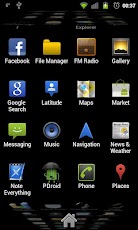

Nike+ Running Android 2.3+ apk v1.0.1. Overview: The most popular running app is now available on Android, for free!

Nike+ Running Apk 1.0.1
Nike+ Running Apk

Map your runs, track your progress and get the motivation you need to reach your goals. No sensor or additional products needed, just grab your phone and go.
- From the trail to the treadmill, your phone's GPS and accelerometer accurately record your distance, pace, and time. In-run audio feedback lets you know these metrics at every mile, so you can stay focused on your run.
- Get in-ear cheers from your friends on Facebook when you broadcast that you’ve started a run. Tag the friends you ran with and share a map of your route with friends and family.
- Have a song that gets you pumped? Set up PowerSongs to give yourself a boost with the tap of a button.
- Our Run Summary makes it easy to view your route and track how you felt, the terrain you tackled, and the weather you endured.
- Rotate your phone while viewing the Run Summary to see the breakdown of your run into mile splits.
- See how your last run stacks up against your previous seven, and get fresh insights based on your latest activity every time you come back to the app.
- Swipe upwards on the Home Screen to view your next moves. From picking your PowerSongs to challenging one of your personal bests, there’s always something to make your running experience better than before.
- Visualize all your runs side-by-side and see your progress in a bar graph history view.
- Syncing your run to the Nikeplus.com website allows you to view your maps on a larger screen, set a new goal, and find Nike+ Top Routes in your area. Check it out.
- There’s even shoe tagging. Type in the name of your running shoes to track the distance they’re logging and see when it’s time to lace up a new pair. You’re never done running, but your shoes might be.
- Need extra motivation? Add a widget to your phone’s home screen to show when you ran last, display your total mileage, and for even quicker access into a run.
- Some features such as Share Run and Cheer Me On require users to be connected to a wireless network for full functionality. Please note that continued use of GPS running in the background could dramatically decrease battery life.

What's in this v1.0.1 :
We're back up and running! We've fixed issues for users running with phone settings in non-English languages. We've also made minor fixes to user settings for height and weight. More updates and new features coming soon. Enjoy your run!


FAST DOWNLOAD
Download Here:
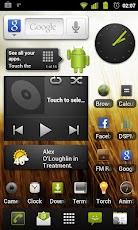

Download VLC media player for Android v0.01 Build0623 free application
Requirements: Android version 2.1+ Apk 0.01 updates
Overview: Offical VLC For Android

VLC media player for Android 0.01 Apk
VLC media player for Android Apk


VLC for Android beta
VLC for Android is in beta stage.
Packages on the Play Store should be available in the next few days.

Features
Plays all files, in all formats, like the classic VLC.
Audio and video media library, with full search.
Support for network streams, including HLS.
Supports Android from version 2.1 (platform-7).
Supports ARMv6, ARMv7 and ARMv7+NEON.
Subtitles support, embedded and external, including ASS and DVD subtitles.
Multi audio or subtitles tracks selection.
Multi-core decoding, for Cortex-A7 A9 and A15 chips.
Experimental hardware decoding.
Gestures, headphones control.

Software performance on phones for H.264
This table is a rough idea of what one can hope to play with VLC on Android, for now, using the software decoder.
Performance is likely to improve in the future.
Name 480p 576p 720p MKV 720p + ASS
HTC One X
Samsung Galaxy S3
Galaxy Nexus
Samsung Galaxy S2
HTC Desire HD
Nexus One

Recommended phones
Galaxy Nexus; (OMAP 4460)
HTC One X; (Tegra 3)
Samsung Galaxy S3; (Exynos 4 Quad)
Motorola Defy; (OMAP 3610)
HTC Desire; (QSD8250 Snapdragon)
Nexus one. (QSD8250 Snapdragon)


ARMv6 nofpu:
FAST DOWNLOAD
Download Here:


Features:
• No ADS
• Profiles
• Set Mode(From widget too): Silent, Vibration & Normal.
• Tone picker for Ringtone, Notification and Alarm
• Sounds while adjusting volume
• Widgets with volume levels and profiles
• No battery drain
• Bluetooth volume
• Ringer volume
• Notification volume
• Music volume
• Alarm volume
• Voice Call volume
• System volume

Planned upgrades:
• Custom Icons for Profiles
• Scheduler
• Big widget
• Auto switch profile on Headphones plug
• more...

Tags:Volume Control Audio Manager Sound Settings Toggle Profiles

What's in this version:
Version 2.7.6
• Added Russian and Czech localization.
• Minor text adjustment.


Download


Are you running out of application storage?
You now can get more available storage space by clearing apps created cache/data files.

Auto or 1-tap to clear all app created cached files and the best is you don't have to ROOT the phone anymore! This app is crucial to anyone who has memory management issues.
★ auto clear all cached files at a specified interval
★ 1-tap to clear all cached files
★ clear cache for a specified application
★ notify you on startup if apps used cache size large than 500K bytes
★ list applications by either cache, data, code, total size or app name
★ view application on Market
★ uninstall application
★ open application
★ show application details page

Same functionalities as "1Tap Cache Cleaner Free" app, but Ad removed.
To clear all cached files, please tap "Clear all cached files" button from the main window, or tap MENU > Clear all cached files.

Tap the application item from the main window, you can clear the cache or data files for a specific app. Long-press the application item will show you more options.

By default, the main window sorts installed applications by used cache size. To sort the list by app name, please tap MENU > Sort by name. You can also sort the list by data, code or total size by changing MENU > Settings > Sort by size option.
The "Clear all cache" function may not work for all Android devices. Please send me the phone model, Android OS version information if it does not work on your device.

Users report the following devices do not support the "Clear all cache" function:
* HTC Thunderbolt

What's in this version:
v1.53
Spanish localization


Download

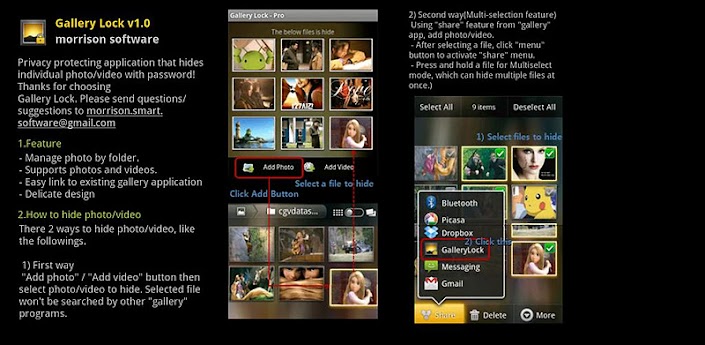
Gallery Lock Pro

Hide Pictures/Videos!
Selected as the App of the Year by Times Magazine!
Gallery Lock manages photos and videos by individually hiding them and it is an app that is absolutely needed for protection of personal privacy. The product is one of the most popular apps in the world and is one of the top 10 apps sold on Google Market.

Features
• Management of photos by individual folders
• Can be used for both photos and videos
• Can be conveniently used with other gallery apps
• Stealth mode provided (a function that hides the icons)
• Beautiful designs
• Pattern lock provided

# (Important!) Before deleting the Lite version, undo the hide function of the photos and the videos. If you uninstall the program without undoing the hide function, the photos and videos will be lost.

# Google will make a pre-charge of $1 the first time a transaction is made on Google Market to verify the information on your credit card. This can be misunderstood as being charged twice but there is no need to worry as this pre-charge will not appear on your monthly statement.

# It is recommended that you purchase the app after checking to see if the free assessment Lite version runs properly.

# "Outgoing Call" permission is needed for Stealth Mode
# Method to recover photos when problems occur
If for some reason Gallery Lock does not run, recovery can be made by following the method below.
1) Uninstall Gallery Lock
2) Download Gallery Lock from the Market and install it.
3) Go Setting in the Gallery Lock, Tap "Find/Recover Missing files" menu.
4) The missing files will be recovered to /mnt/sdcard/DCIM/recover path.
5) run default Gallery application and check whether those files are recovered properly.

Download

Lucky Patcher v1.9.4 APK 1.9.4

8:46 PM Thursday, June 21, 2012


Free Download Lucky Patcher v1.9.4 Android 2.1+, Rooted devices and updated Lucky Patcher 1.9.4 apk full version. Overview: You can use this patcher to break some apps' Android Market License Verification or other Verifications.


Lucky Patcher APK 1.9.4 for android


Version 1.9.4
~ Translates updated;
~ Clear Data bug fixed


IF NEEDED DOWNLOAD LUCKY PATCHER HERE:
CLICK LINK==> LUCKY PATCHER
DIRECT DOWNLOAD
Download Here:

Relax Melodies Premium

Try Relax Melodies Premium for your Android today!
Relax Melodies Premium, the leader in personalized relaxation and sleep assistance, is now available for your Android Phone! No more insomnia for you, tension is a thing of the past at any moment! Just custom mix your favorite high quality sounds from a selection of 82, then slip naturally into a relaxed state or a deep, rejuvenating sleep. This is the ultimate relaxation experience and it's super easy to use!
FEATURES:
* Sound background support. Relax while using other apps! 

* Mix your favourite sounds together with different volume to create your own personal melodies 
* 82 High quality ambient sounds including 6 binaural beat frequencies for brainwave entrainment. 
* Timer system to stop the melodies when you go to sleep
* Individual sound volume adjustment
* Save, name and replay your favorite mixes easily 
* Complete and easy to follow help screen

Get the most personalized relaxation experience it’s possible to have. With just a few taps, you can create the exact MELODY that resonates perfectly with you. With ambient and binaural selections, you can choose whether to simply relax or tell your brain that it’s time for sleep. It can even help your baby fall asleep faster!
Download it now and become one of the million relaxed users of Relax Melodies. You’re going to love how it will help you relax, meditate and sleep.
Download

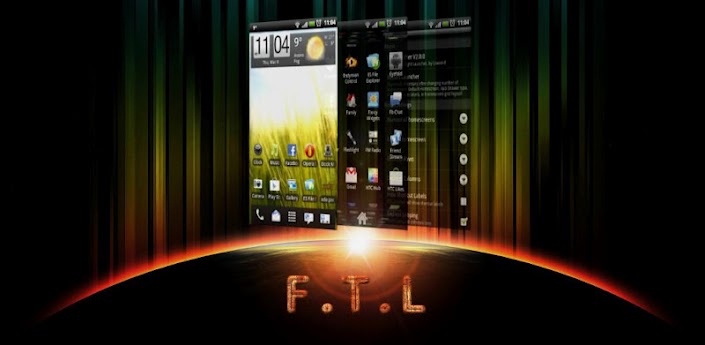
FTL Launcher Pro

FTL Launcher - Break all rules, go Faster Than Light!
The Faster Than Light Launcher, Pro Edition

Make no mistake, this is the fastest launcher you'll ever run. Small, light, configurable. The Gingerbread launcher as it should have been. No useless stuff, no compromises. Performance and usability are the driving forces here.

On version 3.0 Pro users have a all new game to play now: The Pro version can use existing ADW, GoLauncher and LauncherPro Icon and Dock themes, giving FTL and unprecedented array of possible theming. You can even mix Dock and Icon themes from different launchers. Google Play is yours for the take.
And of course you still have the other extras: configurable homsecreen grid from 4x4 to 6x6, resizeable widgets, and, never seen in any launcher: control over core Android window animation speed.
Important: FTL supports all resolutions and ICS, but only 800x480, 854x480, 960x540 and 480x320 devices have 3D drawer enabled! Also ICS has no 3D drawer because it does not contain the "old" opengl interface. But as it is natively accelerated anyway, 2D drawer should be very fast.
Features:
- Theming support: The Pro version can use existing ADW, GoLauncher and LauncherPro Icon and Dock themes, giving FTL and unprecedented array of possible theming.
- Tweaked for extreme speed and smoothness
- Fully accelerated 3D Waterfall app drawer
- Option to use "normal" 2D app drawer
- Configurable support for resizeable widgets: only when adding them to the homescreen, you cannot edit them later.
- Configurable Homescreen grid: From 4 to 6 rows, and 4 to 6 columns
- Configurable number of homescreens: from 1 to 9 with configurable default homescreen
- Choice between 3 and 5 icon Dock
- Configurable Dock icons size
- Configurable "swipe down" and "swipe down" independently to any of the following:
*show homescreen previews
*open app drawer
*hide status bar
*show and hide status bar
*open and close dock bar
- Includes anim speed: precise control over core Android windows/transition animation speed
- Configurable Support for launcher auto-rotation
- Configurable Infinite looping of homescreens
- Configurable support for scrollable widgets
- Configurable bounce effect on homescreen transitions
- Configurable wallpaper scrolling
- Configurable transition speed of homescreens


Basic Instructions:

- On first boot, homescreens will be empty. Long-press anywhere and start adding stuff!
- You can add/change the shortcuts on the dock bar: Long-press the place you want, and wait for the a popup to show, allowing you to choose what activity you want there.
- You can uninstall apps directly from the homescreen: long press the shortcut (even in the app drawer), drag it to the trash can that appears where the dock was. If you drop it immediately FTL will only remove the shortcut, but if you wait a bit before droping, FTL will offer to uninstall the app.

Try it, you won't regret it!
Download